

BRF+ in SAP explained: what it is and how to manage business rules efficiently
Introduction
In modern SAP systems, business logic often needs to be flexible, transparent, and easy to adjust — without the need for constant code changes. This is where BRF+ (Business Rule Framework Plus) comes into play. BRF+ is a rule engine integrated into the SAP NetWeaver platform that provides both a comprehensive application programming interface and an intuitive user-friendly interface for defining, managing and executing business rules without the need for technical knowledge.
Key features of BRF+
Below are some of the ey features that make BRF+ a powerful and flexible tool for managing business rules in SAP:
• No-Code Logic Management: BRF+ allows both developers and business users to define, execute, and maintain business logic directly in the system — without writing any ABAP code. Using intuitive, visual tools, you can build rules that range from simple conditions to complex calculations or decision tables. By keeping decision logic separate from ABAP programs, BRF+ ensures a structured, transparent, and user-friendly environment that makes rule creation and maintenance easier, faster, and more efficient.
• Management and Versioning: With BRF+, managing and versioning your rules is simple and transparent. You can easily track every change, compare different versions, and revert to an earlier one if needed. This ensures full traceability and control over the evolution of your business logic.
• Integration: BRF+ integrates seamlessly with other SAP modules such as SAP S/4HANA and SAP ERP. This enables centralized management of rules across your systems, ensuring consistent business logic and higher process efficiency.
• Simulation and Testing: Before deploying new rules, you can simulate and test them directly in BRF+. This helps to ensure that the rules behave as expected and allows you to detect potential issues early, before they affect production systems.
• Performance and Scalability: Designed for enterprise environments, BRF+ provides excellent performance and scalability. It can process large data volumes efficiently, ensuring smooth and reliable operation even in complex business scenarios.
Key components of BRF+

To effectively work with BRF+, it’s essential to understand its core building blocks. BRF+ is designed to centralize and simplify business rules management, but its true power comes from the components that make up the framework. Each component serves a specific purpose, from defining input and output data to creating complex decision logic, and finally executing rules in a consistent and reusable way.
In the following section, we will explore the main BRF+ components, their roles, and how they interact to implement business rules efficiently in SAP.
• Application: top-level container in BRF+. It groups together all related elements such as functions, rules, expressions, and data objects. Think of it as a project folder that keeps everything organized. Each application defines its own namespace and settings, helping you manage different business rule sets independently — for example, by department, process, or system module.
• Function: entry point to business logic in BRF+. It defines the input and output data and specifies which rules, decision tables, or decision trees should be executed. Functions can be called from ABAP programs, workflows, or other SAP components, making them the central mechanism for applying business rules in a structured and reusable way.
• Function call: allows one BRF+ function to invoke another function. This enables modular and reusable rule design, letting you break complex logic into smaller, manageable pieces. By using function calls, you can organize your rules more efficiently and avoid duplicating logic across different processes.
• Rule: the smallest unit of logic in BRF+. It can be a simple condition, a calculation, or a formula that evaluates input data and produces an output. Rules are the building blocks used to implement specific business decisions in a clear and precise way.
• Rule Set: group of rules that are evaluated together in a defined order. This allows you to combine multiple rules into a single unit of logic, making complex business decisions easier to manage and execute consistently.
• Data Objects / Data Elements: define the structure and type of data used as input or output in BRF+ functions and rules. They ensure consistency and accuracy by specifying data types (e.g., string, number, currency) and formats. These objects act as the bridge between your business rules and the actual data in SAP, allowing rules to process information correctly.
• Decision Table: tabular way to define business rules based on multiple conditions. Each row represents a rule, with columns for input conditions and corresponding outcomes. Decision tables make it easy to manage complex logic, visualize all possible scenarios, and maintain rules efficiently without writing code.
• Decision Tree: hierarchical structure used to model complex business logic. It evaluates conditions step by step, branching out based on the outcomes of each decision. This visual approach makes it easier to understand, maintain, and execute rules that depend on multiple levels of conditions.
• Formula: an expression used to perform calculations or manipulate data within BRF+. It can include arithmetic operations, logical comparisons, or string manipulations, and produces a result that can be used by other rules, functions, or decision tables.
• Loop: allows you to iterate over a table or a collection of data objects within BRF+. It enables repetitive processing of each row or item, applying rules, formulas, or actions to every element in the set.
• Procedure call: enables you to execute an external ABAP procedure or method from within BRF+. This allows you to extend BRF+ logic with custom code for complex operations that cannot be handled by standard rules, formulas, or decision tables.
There are also other specialized components and features in BRF+ that extend its capabilities even further. These include actions, different types of expressions and advanced result handling. Depending on your business requirements, you can explore these additional elements to create even more flexible and powerful business rules.
BRF+ Example: Step-by-Step Guide
In this example, a sample BRF+ application is created to determine customer benefits using various BRF+ components and is ultimately tested via an ABAP report.
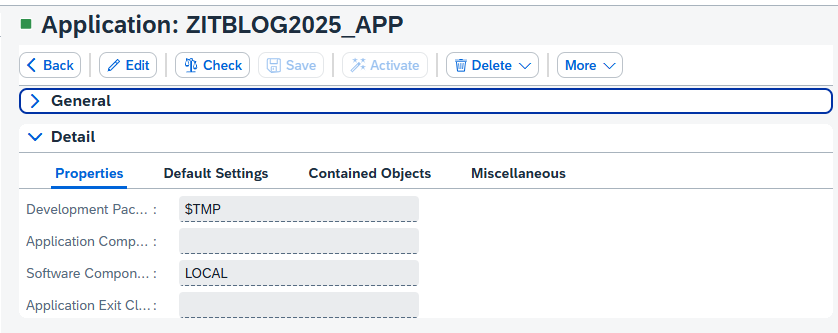
1. First, open BRFplus using the transaction code “BRF+” and create a new BRF+ application. In this example, a local BRF+ application named ZITBLOG2025_APP has been created:
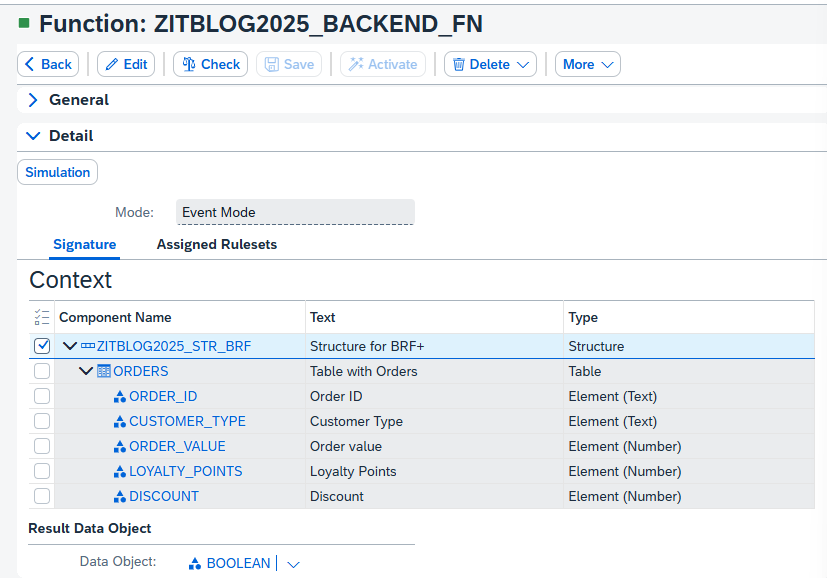
2. The next step is to create the function ZITBLOG2025_BACKEND_FN, which will serve as a bridge between the backend and BRF+. In other words, this function will be called from an ABAP report to start processing. The context of the function has been defined using the DDIC structure ZITBLOG2025_STR_BRF. The context will be set up just before the actual function call, which will be shown later.
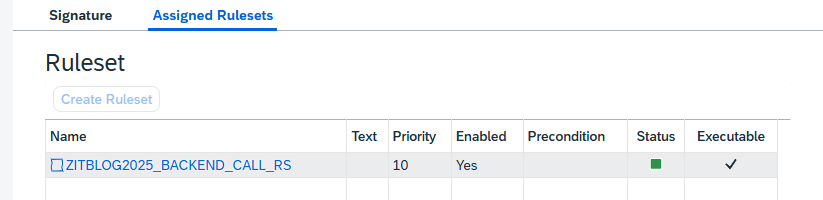
In the “Assigned Rulesets” tab of the function ZITBLOG2025_BACKEND_FN, the ruleset ZITBLOG2025_BACKEND_CALL_RS has been added:
3. The ruleset ZITBLOG2025_BACKEND_CALL_RS calls ZITBLOG2025_BUSINESS_CALL_FC, which is a “function call” component:

This component, in turn, calls another function ZITBLOG2025_BUSINESS_FN:
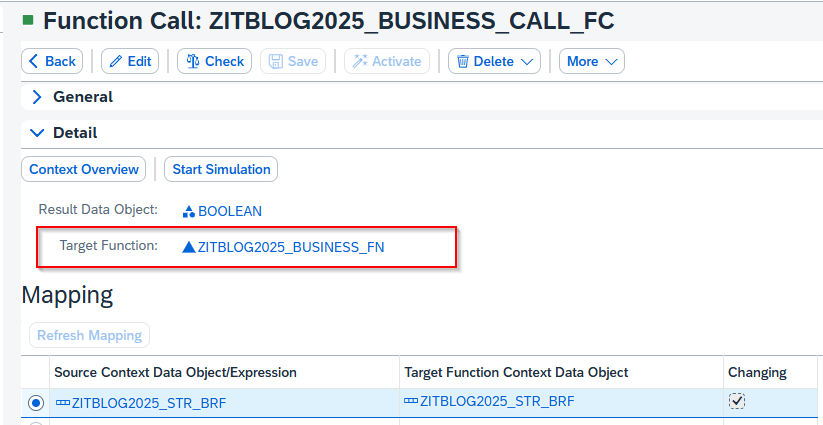
This setup may seem a bit complicated and a bit unintuitive, but it is designed to clearly separate the backend call from the actual business processing.
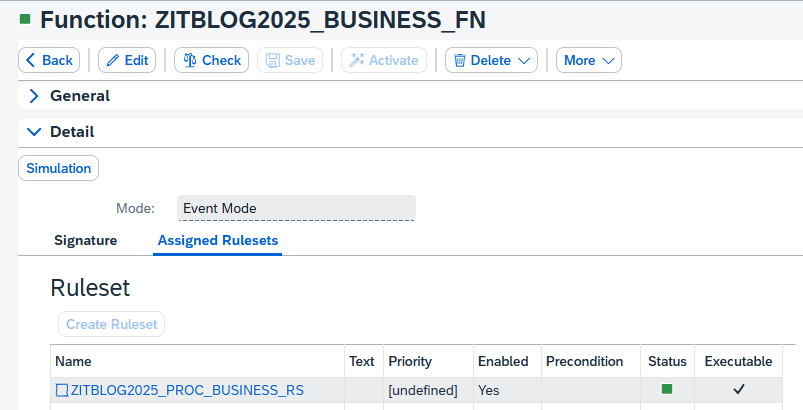
4. Inside the function ZITBLOG2025_BUSINESS_FN, different rulesets can be assigned to process business logic. In this example there is only one ruleset assigned to the Function, which is ZITBLOG2025_PROC_BUSINESS_RS:
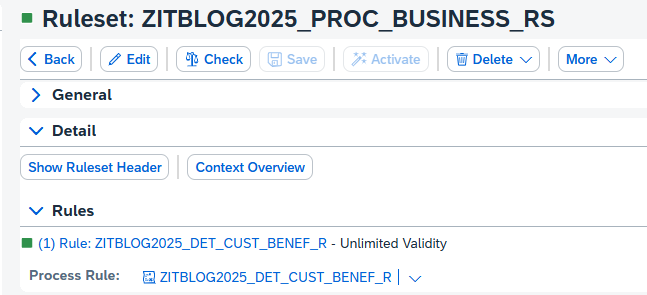
5. Inside ZITBLOG2025_PROC_BUSINESS_RS there is one rule ZITBLOG2025_DET_CUST_BENEF_R being processed to determine customer benefits:
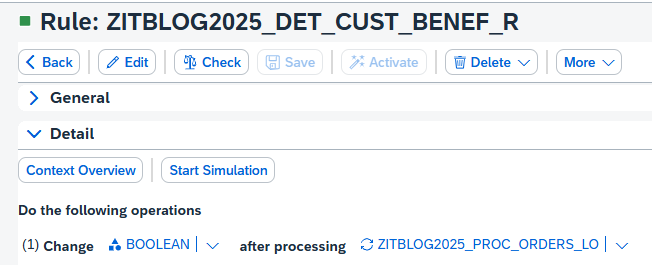
6. The rule ZITBLOG2025_DET_CUST_BENEF_R executes the loop component ZITBLOG2025_PROC_ORDERS_LO:
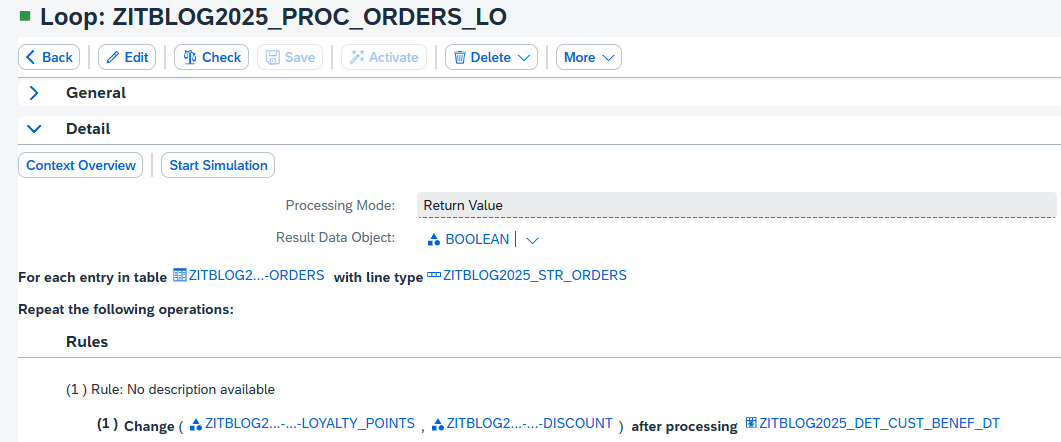
7. The loop ZITBLOG2025_PROC_ORDERS_LO iterates over the table of orders. For each row, the “decision table” component ZITBLOG2025_DET_CUST_BENEF_DT is being executed:
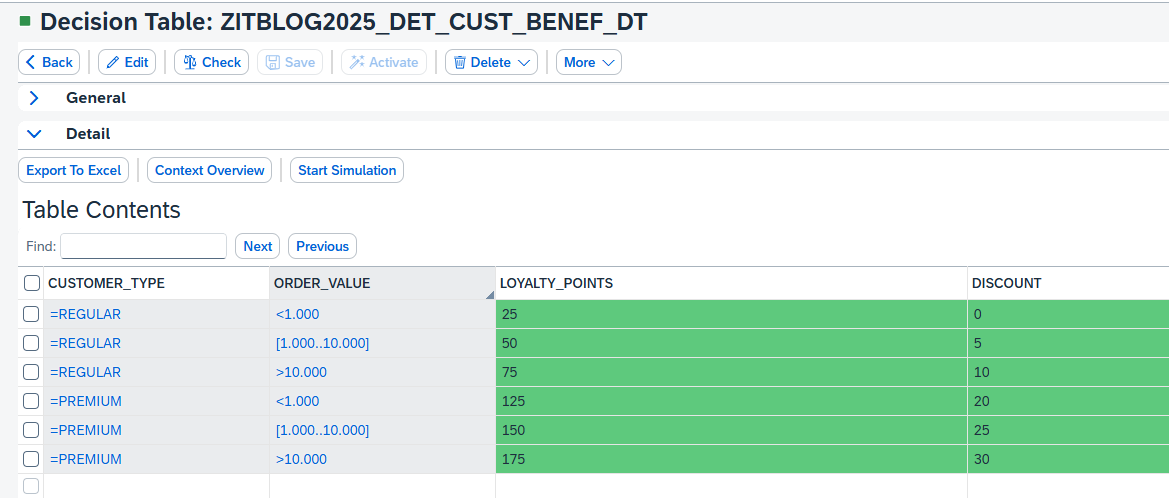
8. The decision table ZITBLOG2025_DET_CUST_BENEF_DT evaluates the input values (Customer Type and Order Value) to determine the corresponding Loyalty Points and Discount:
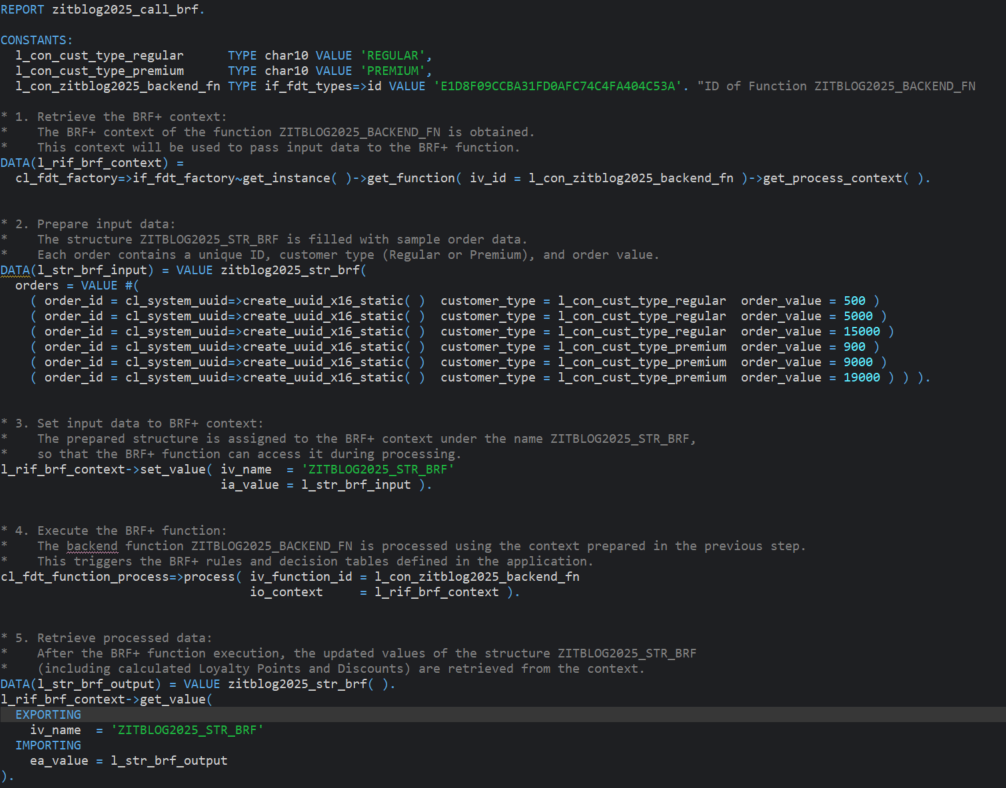
9. Finally, an ABAP program ZITBLOG2025_CALL_BRF, was created and executed to test the BRF+ application:
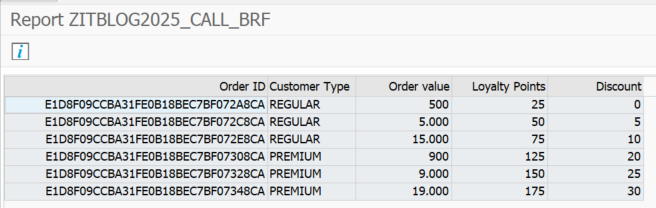
The processing results are presented in the following ALV table:
Conclusion
With BRF+, managing business logic in SAP becomes simpler, faster, and more transparent. It allows you to:
• Define decision logic — rules, formulas, expressions, and decision tables — without writing any ABAP code.
• Eliminate the need to create and maintain custom tables for validation and avoid the traditional practice of hardcoding values.
• React quickly to business changes such as new policies, thresholds, or validation requirements.
• Empower business users to manage and adjust rules independently from developers.
• Ensure transparency and reusability by centralizing all rules in one place.
Thanks to its intuitive web-based interface, BRF+ supports modeling complex rules, linking them directly to SAP processes, and testing outcomes in real time. Whether you need to calculate tax rates, define approval workflows, or validate incoming data, BRF+ provides a configurable and reusable way to make smarter business decisions.
At ConVista, we help organizations unlock the full potential of BRF+ by designing flexible, maintainable, and future-ready rule management solutions within SAP landscapes.

.svg)

.svg)

