

From Open-Source LLMs to SAP Business Assistants: Building AI-Powered SAP Applications
1. Introduction
In an SAPenvironment, choosing an AI model implementation is not just a question ofquality, but also of security, control over data, and integration with theexisting landscape. Choosing own foundation model—an LLM or LMM, including onethat is not offered through SAP AI Launchpad—makes it possible to adapt it tothe specifics of the enterprise and use AI to solve business problems.Techniques such as fine-tuning allow a model to be specialized for a particularlanguage, terminology, or the nature of an organization’s business processes.Itis also possible to conduct own security and quality tests and exercise greatercontrol over how the model operates, making the solution easier to audit.
Own model alsoprovides greater control over costs and infrastructure. With a high volume ofoperations—such as classifying tickets, analyzing customer claims, orprocessing thousands of documents—per-token pricing for an external API canlead to significant costs. With own infrastucture, GPU and maintenance costsare more stable and, depending on scale and business circumstances, may provemore economical.
2. Obtaining a Foundation Model
A good startingpoint is to compare several foundation models that have been pre-tuned to actas assistants. The selection should be guided by test results and licenseterms. It is also important to consider the expected format of the data userswill provide when specifying prompts. If prompts are expected to include notonly text but also images, audio files, documents, and similar content,consider multimodal models (LMMs—Large Multimodal Models) that support theanalysis of those formats.
For an exampleassistant that analyzes maintenance notifications in the SAP PM module, wewould test its understanding of technical messages, its ability to work in thechosen language, and the correctness of its structured responses. If the modelis expected to propose function calls, we would also test tool calling. Contextlength, latency, and memory requirements at the target number of concurrentrequests are also important.
2.1 Model Selection
Foundationmodels can be found in the Hugging Face repository or the Ollama model library.Depending on whether it is necessary to fine-tune the model, pay attention tothe format in which its weights are stored. The GGUF format contains themodel’s weights, tokenizer, architecture, and hyperparameters. It was designedfor efficient local inference and quantization. The main use of Safetensors, aformat developed by Hugging Face, is fine-tuning model weights. Afterfine-tuning, the model should be converted to GGUF format.
2.2 The Ollama Inference Server
Ollama is afree, open-source tool that allows to run and operate large language modelslocally on proprietary computer or server. It can be compared to “Docker forartificial intelligence”: instead of application containers, Ollama downloadsand runs ready-to-use AI models. Like the containerization software mentionedabove, Ollama is operated using command-line instructions. The tool makes itpossible to create a server that hosts an LLM or LMM and communicates withexternal software through an API. Ollama optimizes model operation for theuser’s hardware, including NVIDIA and AMD graphics cards and Apple M-seriessilicon.
3. Fine-Tuning the Foundation Model
If the promptand context do not provide sufficient quality, fine-tuning may be worthconsidering. Several tools on the market can be used to fine-tune a model. Oneof them is Unsloth Studio.
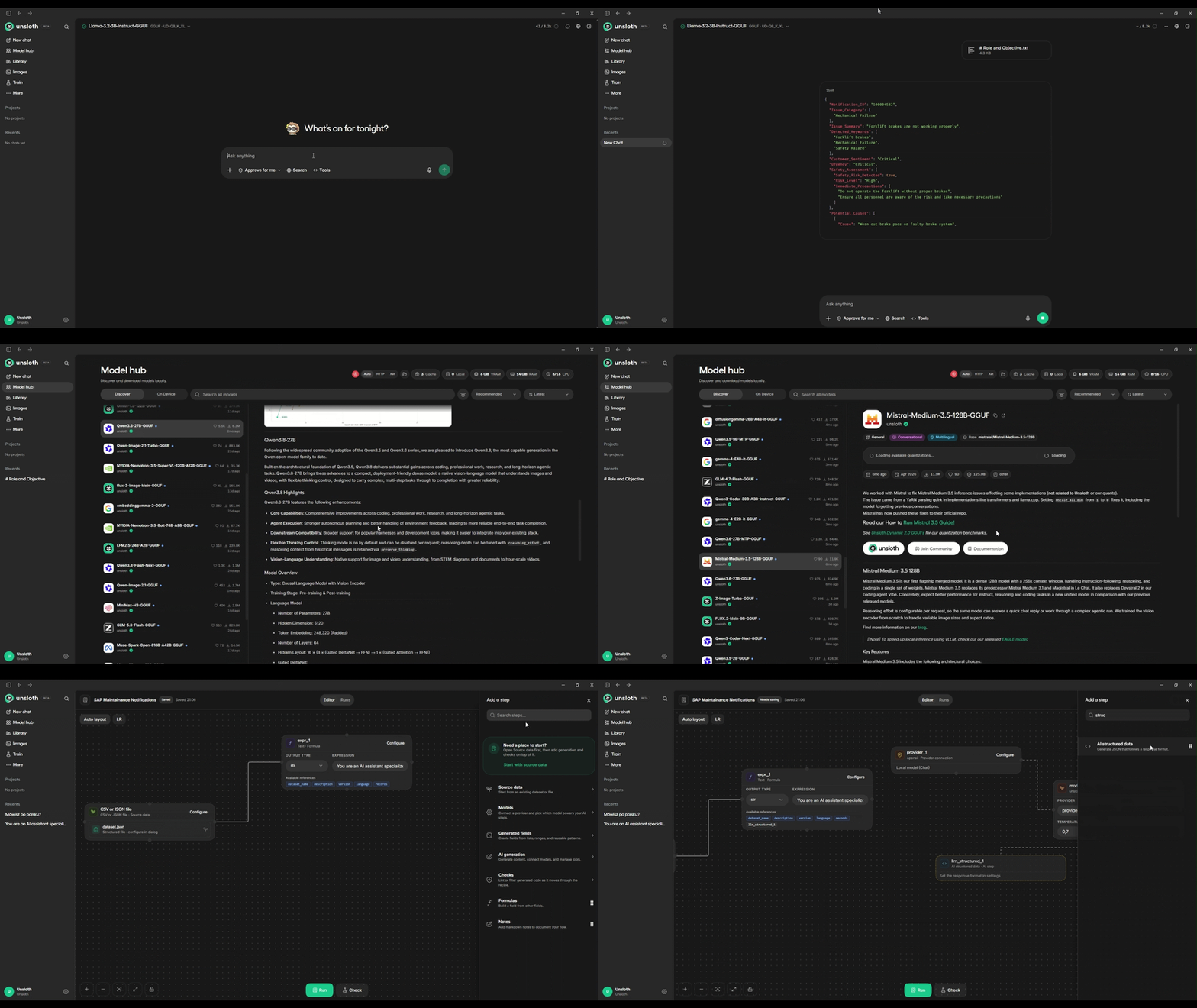
Unsloth Studiois open-source software for training and running open large language models(LLMs) on own computer. It works without coding and supports local modelinference, synthetic training data generation, and model fine-tuning.
3.1 Is Fine-Tuning Necessary?
Before decidingto fine-tune a model, it is worth asking a fundamental question: is the problemrelated to the model’s behavior or to a lack of knowledge? Fine-tuning weightsis highly effective at teaching a style, response format, or specific notation.However, it is an inefficient way to store facts when enterprise data changesfaster than the training cycle. In practice, fine-tuning should be the finaloptimization step, considered only after the possibilities of promptengineering have been exhausted.
Beforefine-tuning a model, consider using RAG (Retrieval-Augmented Generation) or CAG(Cache-Augmented Generation), which uses the context window. Instead of relyingon the model to “remember” an answer from its training, we give it access torelevant documents when the question is asked—from a vector database in thecase of RAG, or from the context window in the case of CAG.
3.2 Training Dataset
When preparinga text dataset for fine-tuning, start by clearly defining the objective: thetask the model is meant to perform, such as classifying tickets, generatingresponses in a particular style, or summarizing documents. Next, collect thedata. It can be prepared by people or generated synthetically by an externallanguage model. If the dataset contains confidential information, anonymize it.The next step is cleaning: remove duplicates, character encoding errors,headers, footers, HTML remnants, and low-quality records. Consistent formattingis important because the model also learns formatting conventions.
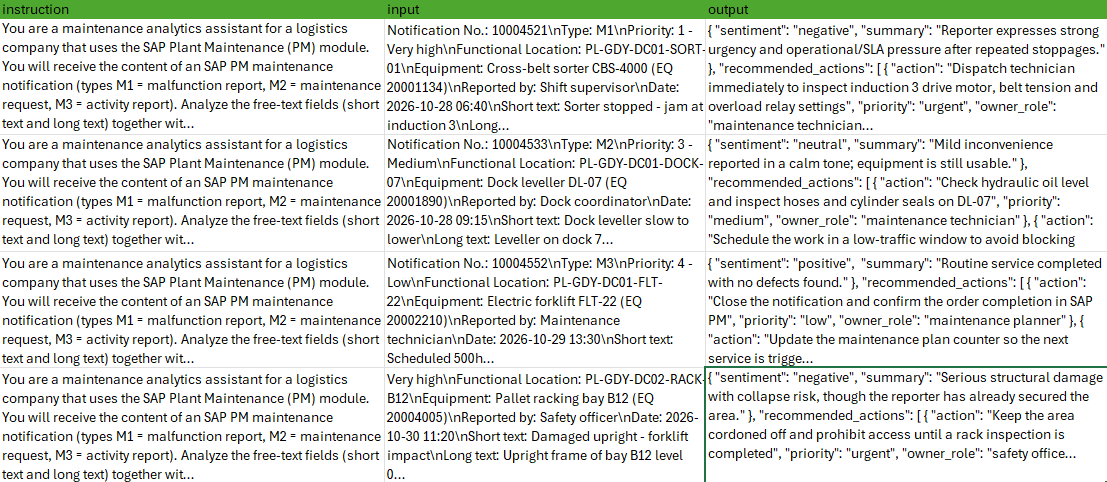
As for thenumber of examples, hundreds of well-prepared records are sufficient for manytasks. A larger dataset generally improves results, but a smaller number ofhigh-quality examples can be more valuable than a large number of mediocreones. Before starting training, check the file syntax, the token length ofexamples to ensure they do not exceed the context limit, and randomly selectedsamples. A well-prepared dataset therefore combines a clearly definedobjective, clean and anonymized data, a consistent format, a sound data split,and systematic quality control.
3.3 Fine-Tuning LoRA/QLoRA Adapters
LoRA (Low-RankAdaptation) is a technique for fine-tuning large models that changes theirbehavior without modifying the original weights. Rather than training billionsof parameters, it trains a small “add-on” that is applied to the existingmodel. QLoRA (Quantized LoRA) is an extension of LoRA that allows very largemodels to be fine-tuned on relatively modest hardware.
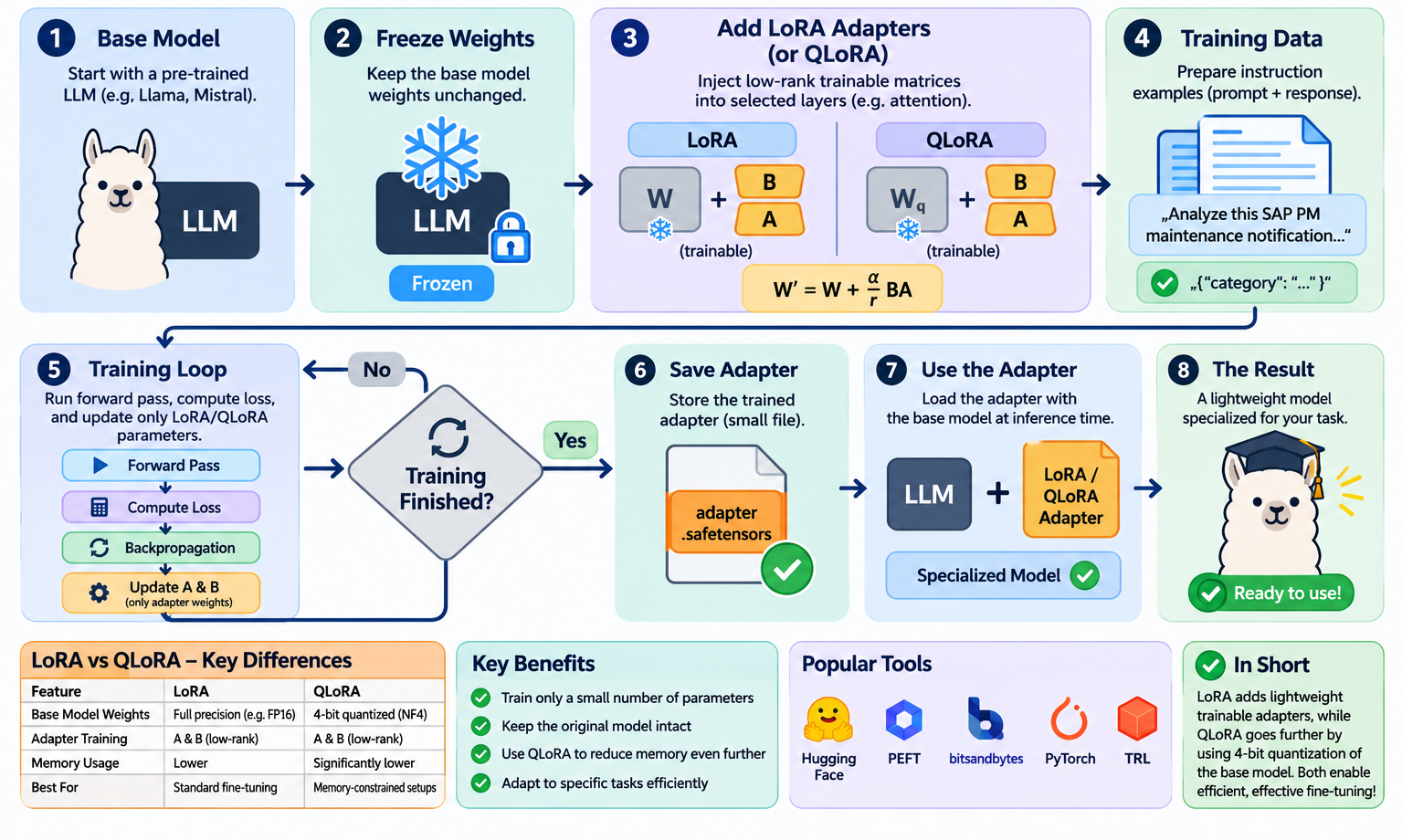
The idea is straightforward: thebase model is stored in memory in a highly compressed, 4-bit form, while theLoRA adapters are trained at higher precision.
3.4 Quantization
Quantizationreduces the precision of the numbers used to represent an AI model’s weights.Instead of 32-bit floating-point numbers (FP32), the model uses, for example,16-bit, 8-bit, or 4-bit numbers.
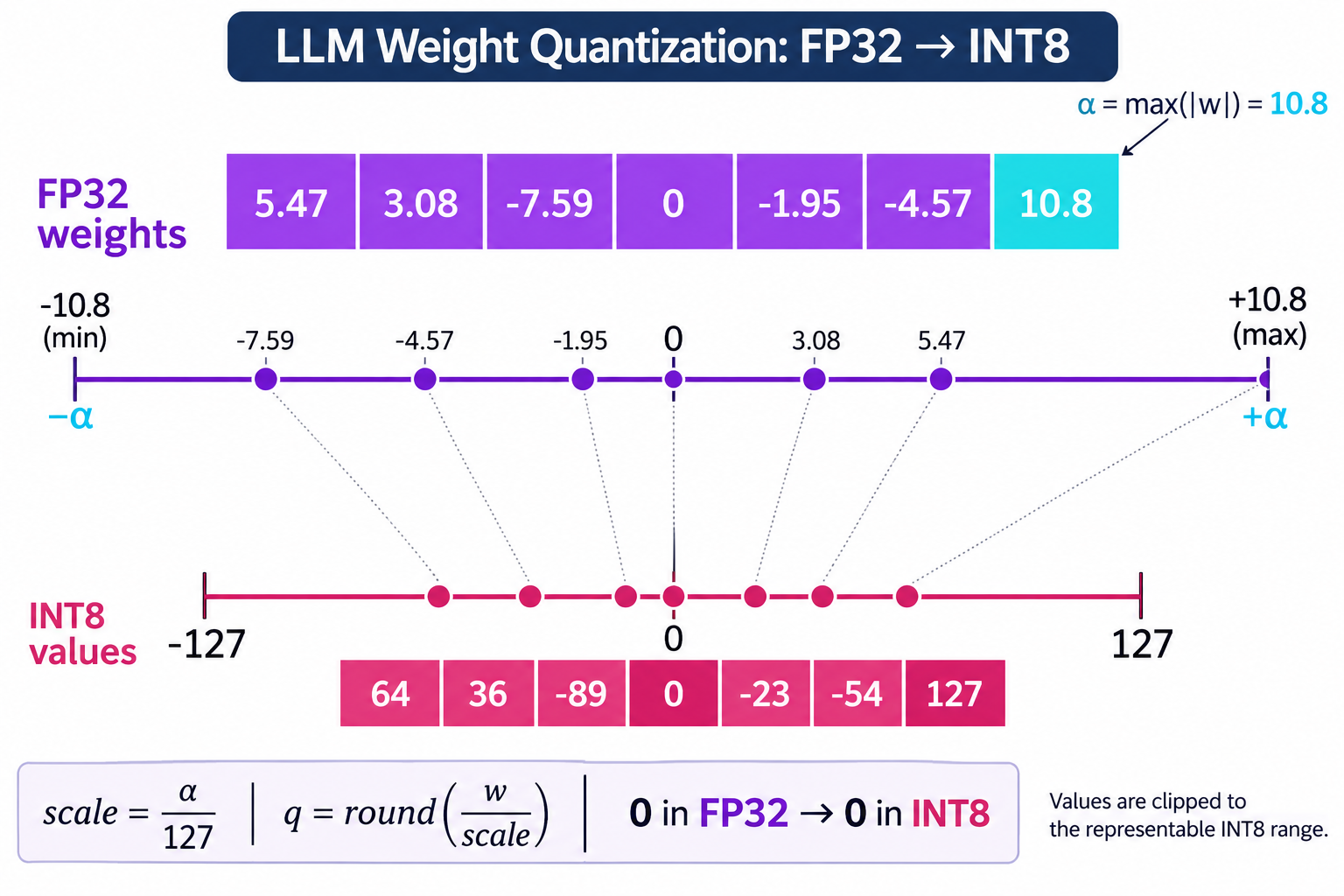
This reducesits memory footprint and speeds up operation, while response quality decreasesto an acceptable level. Lower precision also means less data must betransferred from memory, which in practice is often a bottleneck whengenerating text. The result is faster inference and lower costs. The trade-offin numerical precision can be acceptable up to a certain point.
4. Using the Model in SAP AI Core
SAP AI Core isa service within SAP Business Technology Platform (SAP BTP) for running andmanaging artificial intelligence solutions. It provides the technicalinfrastructure for both custom machine learning models and applications thatuse generative AI. Among other things, the service enables users to train anddeploy their own models, run models as API services, and manage the modellifecycle.
SAP AI Corerequires to run own inference server on which the model will operate. Theinference server must meet several conditions:
- It must run as a Docker container.
- Its API endpoints must have a version prefix, such as/v1/… or /v2/….
- It must have a serving template: a YAML file describinghow the model is deployed.
- A GitHub repository for hosting serving templates mustbe linked to the AI Core application.
If the model isnot pulled directly from the Ollama catalog—for example, if it was fine-tunedon a workstation—its weights must be copied directly into the Docker image. Ifthe model is downloaded directly from the internet, configure an nginx serverin front of the Ollama server as a reverse proxy to translate prefixes from/api/* to localhost:11434/api/*. Push the image to a registry, such as DockerHub, then create a serving template in YAML format that specifies the image,input parameters such as the model name and resource plan, and theinfrastructure. Place the template in a GitHub repository and connect it to SAPAI Core. After synchronization, create a configuration and start a deployment,either manually in SAP AI Launchpad or with a script.
Afterdeployment, download the model through the pull endpoint if it is not alreadyin the image. Then invoke it over HTTP using an OpenAI-style API, an AI Coretoken, and the ai-resource-group header. This works with any language thatsupports HTTP. Alternatively, use the SAP Generative AI Hub SDK, which isavailable for Python.
5. Prompt Management in SAP
Prompt Editoris where prompts are created and tested. Prompts can be formulated for thefollowing roles: System (the foundation of the model’s behavior, personality,rules, constraints, and global context), User (a query, task, or direct messagefrom a person to the AI), and Assistant (the response generated by the model).Model parameters can be adjusted, with the available options depending on theselected model. Tested prompts are saved as templates using the SaveTemplate button.
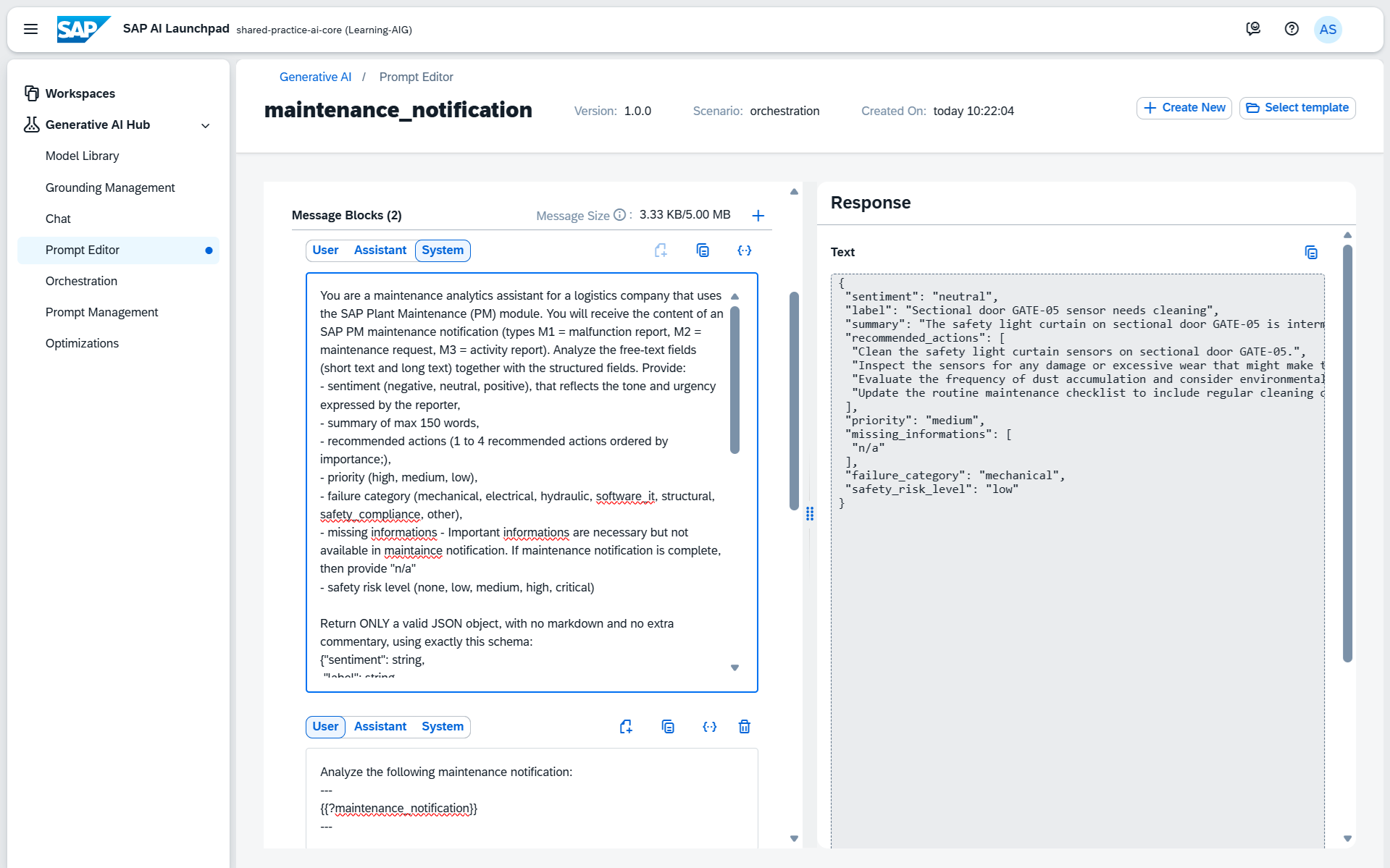
PromptManagement manages saved templates. It contains all templates and theirversions, and a selected version can be reopened using Open in Prompt Editor.The change history is retained, and prompts can be reused across projects.
The PromptRegistry API is used in applications to create, retrieve, and manage templates.Orchestration Service can refer directly to a template instead of sending theprompt text with every call.
Prompt Editorand Prompt Management can also be used with open-source models deployed in SAPAI Core through BYOM. However, the documentation primarily describes thesefeatures for foundation models in Generative AI Hub. Prompt Registry can beused through SAP Cloud SDK.
6. Conclusion
The approachpresented in this article should not automatically be selected for everyproject. SAP also provides access to open-source models hosted on its owninfrastructure, including through Generative AI Hub. This approach can offer acompromise between the convenience of a managed solution and the benefits ofopen-source models. Using own model—the BYOM (Bring Your Own Model)approach—becomes particularly interesting when available models do not meetspecific requirements, such as fine-tuning, support for certain data types, orfull control over where data is processed.


