


Media Streaming in SAP OData V4: How to Get Started
INTRODUCTION
Nowadays, many business processes rely on data stored in files as well as on operations related to their processing. Manual handling of such processes is error-prone, which is why solutions enabling reliable data exchange between systems and applications play a crucial role in modern system landscapes.
One such solution is the OData protocol, which provides a standardized communication approach and allows CRUD operations to be performed using HTTP requests. As a result, it enables seamless integration with mobile and web applications.
With the evolution of application architectures and increasing requirements for file handling—especially binary content—the limitations of OData V2 became more evident. Although OData V2 offers basic support for file transfer in the form of Media Entities, this approach is relatively limited.
To address these challenges, SAP introduced support for OData V4, which is the strategic protocol version for the ABAP RESTful Application Programming Model (RAP). OData V4 enables the implementation of more flexible and efficient services, among other things through native support for binary data streaming (Media Streaming).
The goal of this article is to present the media streaming capabilities of OData V4 in the context of SAP RAP and to explain how binary content can be efficiently exposed and consumed using RAP-based OData services.
WHY ODATA V4?
The OData V4 protocol, in addition to the core functionality of its predecessor, introduces a few enhancements that improve both developer experience and overall solution quality. The most important changes include:
- Support for additional data types, such as Date, TimeOfDay, Single, and Enum – this reduces the number of conversions between ABAP and OData and allows for more accurate representation of numeric and domain-specific data types.
- Optimized data streaming – binary files can be transferred as streams rather than only as complete objects. In addition, MIME type handling is simplified.
- Separation of metadata from the file data stream – this has a positive impact on query optimization, as the service retrieves only the data that is required at a given time.
- Improved HTTP protocol support – OData V4 supports Chunked Transfer Encoding, allowing large files to be transferred in parts instead of being sent as a single payload, as in OData V2.
- Scalability – for example, a more compact payload and support for asynchronous processing.
BASICS OF MEDIA STREAMING IN ODATA V4
Media streaming in OData V4 enables the transfer of large objects (hereinafter referred to as LOBs), such as images, PDF documents, or Excel sheets, in a streaming manner. In this approach, entity metadata is separated from the data stream, and files are not retrieved immediately. Metadata is checked first, allowing the client to filter and download only the files that are needed at a given moment. This improves application performance during file operations while maintaining a user-friendly experience for the end user.
In OData V4, media streaming is implemented by transferring binary data using Media Entities of type Edm.Stream. Files are exposed similarly to OData V2 using the standard $value endpoint. In SAP RAP, binary content is stored in database tables, typically as large objects (LOBs). For more complex scenarios—such as file validation, conversion, or content modification—this logic is implemented via actions that operate on the data stored in the database.
It is also possible to use OData V4 without RAP modeling or BehaviorDefinitions—in such cases, $value and Media Entities function according to the standard OData protocol.
HANDLING LARGE OBJECTS IN ODATA V4 (LOBs)
Although OData V4 still supports Media Entities known from OData V2, LOBs are handled using standard data types and dedicated upload/download actions.
The primary data types used for working with LOBs are:
- RAWSTRING – a type suitable for storing very large files (binary content). In OData V4, it is mapped to Edm.Stream,
- STRING – a type for storing text content; not suitable for binary files. In OData V4, it is mapped to Edm.String.
LOBs are modeled using the following fields:
- ATTACHMENT
- MIMETYPE
- FILENAME
The ATTACHMENT field contains the LOB and is technically associated with the MIMETYPE field, which defines the content type of the attachment. The FILENAME field is optional. In Fiori Elements interfaces, the values of MIMETYPE and FILENAME are automatically derived from the ATTACHMENT field based on CDS annotations, making ATTACHMENT the only field that end users need to interact with directly.
CREATING AN ODATA V4 SERVICE – WHERE TO START
Implementation of OData V4 is recommended using SAP RAP (RESTful ABAP Programming), as it provides full support for CDS Entities, Business Object Behaviors, and Projection Views, enabling the development of modern and efficient services. Users can still use the SEGW transaction, but its capabilities in the context of OData V4 are limited.
Creating an OData V4 service with LOBs based on SAP RAP can be described in the following steps:
STEP 1: Data model preparation
The service development process should start with carefully designing and modeling the database tables that will store the data required by the service. In our example, the table stores the employee’s first name, last name, and photo. To store file-related information—in this case, the photo—the table should include the three fields mentioned earlier in this article:

- ATTACHMENT – this field contains the LOB. The data element ZTEST_ATTACHMENT is of type RAWSTRING with length 0, which means it is a dynamically sized field. In some scenarios, for example in the BTP ABAP Environment, the RAWSTRING type cannot be used directly, which is why the data element ZTEST_ATTACHMENT was created.
- MIMETYPE – specifies the type of file. This field is of type CHAR with a length of 128.
- FILENAME – the file name, a CHAR field with a length of 128.
STEP 2: Defining the fields storing LOB data
Once the table is prepared, you can start creating the first CDS views, which will expose the data from the table. At this stage, it is important to annotate the relevant fields properly. To enable proper data streaming, a root entity must first be defined—that is, the main CDS entity that will be exposed via OData. For media streaming, the field that stores the file content (in our case, the ATTACHMENT field) must be annotated in Root View with the prefix @Semantics.largeObject. This ensures that OData V4 and SAP RAP treat the field as a media stream, meaning the file content will be separated from the metadata.
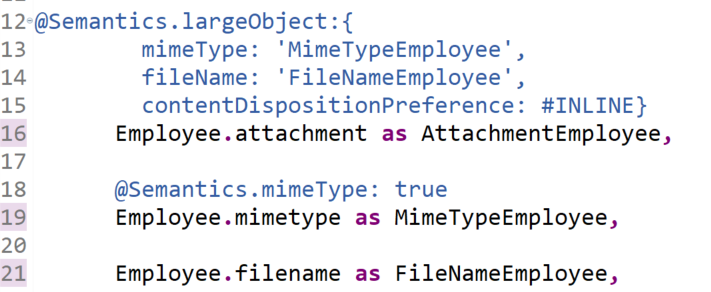
MIMETYPE and FILENAME link the corresponding database table fields to the LOB object. The contentDispositionPreference property defines whether the file should be displayed inline (#INLINE) or downloaded (#ATTACHMENT) when clicked. The CDS annotation @Semantics.mimeType: true is used to mark a field as a MIME type.

The annotation @Semantics.imageUrl: true on the ATTACHMENT field in the Projection View is required for a Fiori App to display the image. If this annotation is not added, only the file name or path will be shown in the column.
In more complex scenarios, the annotation @Semantics.largeObject.acceptableMimetypes can be used to restrict the types of files that can be uploaded. In such cases, validation and error handling for unsupported file types is handled automatically by the RAP framework.
STEP 3: Behavior Definition
After all entities are created, a Behavior Definition must be created for the Root Entity. It defines how CRUD operations are handled, allows mapping of input parameters, and supports additional functionalities, such as:
- specifying the database table to which the entity maps,
- locking records during update or delete operations,
- defining and implementing custom functions, e.g., for reading/writing files.
STEP 4: Service Definition and Service Binding
Once the Behavior Definition and its implementation are complete, the final step is to create the Service Definition and Service Binding. To ensure correct operation, it is important to select OData V4 as the protocol version.
STEP 5: Metadata Extension
An optional step is to create a metadata extension, which allows managing how data is displayed in Fiori apps, e.g., columns in a List Report or facets in an Object Page.

SUMMARY
Using OData V4 in SAP RAP enables efficient handling of files like LOBs, ensuring streaming data exchange and seamless integration with Fiori Elements. This approach overcomes the limitations of OData V2 in file handling. The solution presented in this article facilitates the development of flexible and scalable business applications and is ready for cloud environments, making it a recommended approach for modern SAP application development.

.svg)

.svg)

